Asking Questions the Smart way
10 Sep 2025“There are no stupid questions!” or are there?
Growing up, teachers, coaches, and parents alike would always tell me and those around me “There are no stupid questions” then as expected sometime later someone would ask a question and they would inevitably get in return a look that makes them wonder if it was even worth asking. As a culture we have pushed this idea that people should ask questions and that it is okay to ask questions but our actions speak otherwise. So how do we avoid the looks of disgust and disappointment along with the snarky comments when we ask a question?
What is a smart question?
Well there can be a lot that goes into asking a smart question so let’s start with an example from Stack Overflow a questions and answers forum for programmers! In the following example we can see a good or “Smart” question. In this example the poster is just asking about some functions in his python package which are not working correctly.
My System/Setup

    Windows 11 (Enterprise)
    Running in VS Code
    Running Python 3.13 in a .venv/
    Using uv (via python -m pip install uv, I cannot download uv via curl on the system I have to use.)

The Project Layout

I have a standard src layout for a Python project with a pyproject.toml file as follows:
Directory Structure

my_project/
├── .venv/
├── img/
├── src/
│   └── lib_name/
│      ├── __init__.py
│      ├── lib_name.py
│      ├── file1.py
│      └── file2.py
│
├── tests/
│   ├── __init__.py
│   ├── test_file1.py
│   └── test_file2.py
│
├── notebooks/
│   └── experimental.ipynb
│
├── .gitignore
├── .python-version
├── README.md
├── uv.lock
└── pyproject.toml

pyproject.toml:

[project]
name = "my_project"
version = "1.0"
description = "My cool project."
readme = "README.md"
requires-python = ">=3.13"
dependencies = [
    "numpy>=2.3.2",
]

[dependency-groups]
dev = [
    "black>=25.1.0",
    "notebook>=7.4.5",
    "pip>=25.2",
    "pytest>=8.4.1",
    "uv>=0.8.14",
]

[build-system]
requires = ["setuptools>=61.0"]
build-backend = "setuptools.build_meta"

[tool.setuptools.packages.find]
where = ["src"]

The Problem

I have already run python -m uv pip install -e . to ensure my project in the src/ directory can be developed in editable mode.

Then, in my notebooks/, I have a simple .ipynb file that runs import lib_name where I get no errors. I then try to access a function in that imported lib e.g., lib_name.func() Which gives me the following error AttributeError: module 'lib_name' has no attribute 'func'.

I'm puzzled as to why the notebook can see my module but not the functions contained within it. Running dir(lib_name) in the notebook only gives me the builtin dunder methods where none of my included functions are visible.
What I've Tried

    Tweaking the pyproject.toml to ensure that setuptools can see the src/ directory when I run the python -m pip install -e . command
    Playing around with the contents of the __init__.py files (currently blank) to try to directly import the functions using __all__ to no avail.
    Implementing solutions from similar questions e.g., this one submitted here.

I'm unsure if this is related to my project structure, a corrupted .venv/, issues with uv when installed via pip, or perhaps an error in my pyproject.toml file.

Any advice/support would be greatly appreciated!
What I like about this question is that he explains his situation, tells you the systems and set up he is working with, and most importantly explains what he has already tried. Another great thing about this question is that the title is clear and conveys the issue in a concise way. The post was only made one day ago but I am sure that after today or a few more todays he will have an answer and when he gets that the right thing to do is mark it as resolved.
How to do it the wrong way.
Below is an example of how not to ask a question.
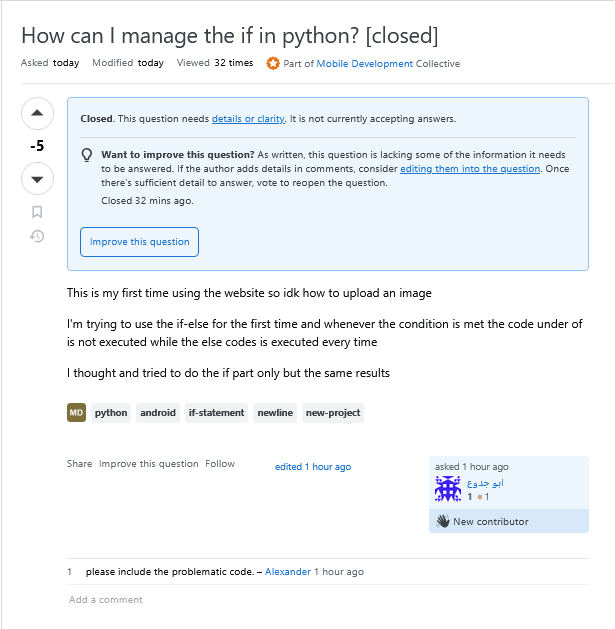
So, what went wrong here?
Well to start off the title could use some work, you can identify he is having a problem with his code in python possibly related to an if statement but that is all. Sadly it only gets worse from here though, one of the big lessons to learn when asking a smart question is exhausting all of your own personal options when it comes to answering it yourself. The poster begins with stating they do not know how to post an image to the board, an admission like this while noble shows that you may have not tried your hardest in fixing your issue or even the issue of trying to convey it to others yourself yet. After this they begin to try and describe their issue but with no image nor any code to show us we can not really understand what is truly going on. Later the poster does end up closing his inquiry after only getting one comment asking him to upload the code itself. This is a good lesson and shows us what not to do and the consequences of your own carelessness can sometimes lead to others not wanting to help you or saying rather distasteful things
Conclusion
So after going through two examples of asking smart questions the main takeaways can sum up to be. Choose an accurate title, make sure your title accurately depicts your problem while also remaining concise. Secondly, provide documentation or images, when asking a question especially ones related to errors in your own work it is essential that you give people the code either typed, through an image, or from a video or file, as these can often show more and tell more than your words can. Thirdly, try your best to solve it yourself before asking others, when you do not try to solve your own issue and instead try to rely fully on other people it shows, and sometimes it will result in no help over a long time when you could have done it yourself. There are many more ways to make sure your questions remain smart and get smart answers but these are the main pieces of advice, programming is hard enough as it is and when asking for help from others it is important that you give people all the means necessary to help you swiftly, and easily.